
Summary: Sign in with a verified client account, choose the closest public help topic, and submit one complete request for the issue.
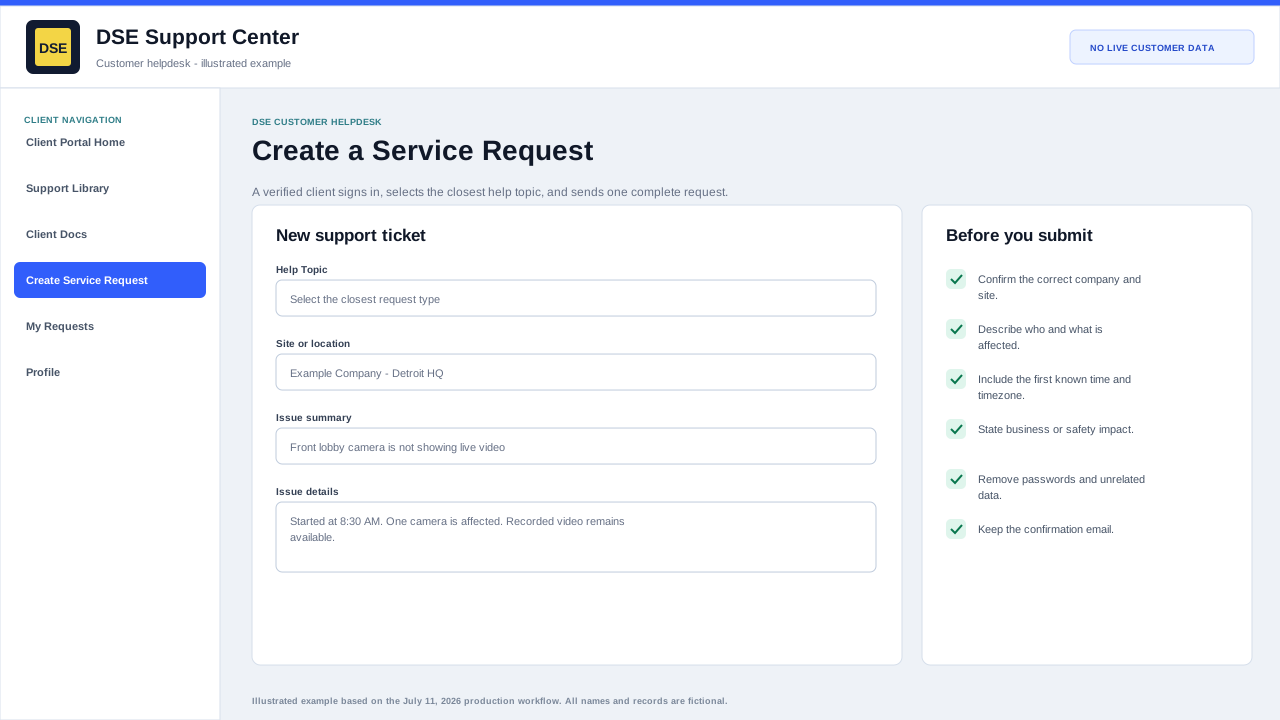
Complete the production ticket form
- Sign in, select Create Service Request, and confirm the correct requester, company, and site when those values are shown.
- Choose the closest help topic. The topic helps DSE display the right fields and route the request.
- Write a short subject that describes the symptom, affected system, or requested decision.
- Describe what happened, when it started, who or what is affected, whether a workaround exists, and what safe checks were already completed.
- Attach only relevant, redacted evidence and wait until each filename appears in the form.
- Review the form once, submit once, and wait for the confirmation page and email.
Verify that submission succeeded
- Record the DSE ticket number and keep the confirmation email.
- Open My Requests or use Check Request Status to confirm the ticket exists before submitting again.
- Reply on the same ticket when additional facts become available.
- If no confirmation arrives, check spam and quarantine, then email helpdesk@detection-systems.com with the time and subject of the attempted submission.
Before opening the form
- Confirm this is a new issue rather than an update to an existing ticket.
- Sign in or create and verify a client account. Production is configured to require client access for portal ticket creation.
- Collect the company, site, callback contact, affected system, start time, business impact, and useful evidence.
Complete the request
- Choose the closest available help topic: Customer Helpdesk, Application Issue, Network Issue, Workstation Issue, Login Issues, or Feedback.
- Write a specific subject that identifies the site and symptom rather than a generic subject such as Help or Broken.
- Describe what should happen, what actually happens, when it began, who or what is affected, and what has already been tried.
- State the business impact in plain language and attach safe evidence when it will shorten diagnosis.
- Review the requester and site context, then select Create Ticket once.
After submission
- Wait for the confirmation page and ticket number.
- Keep the confirmation email and reply in the same ticket conversation.
- If no confirmation appears, check My Requests before submitting again.
- Add new information to the original request instead of opening duplicates.
Related resources
Content owner: DSE Service Operations · Production review: July 11, 2026